
Overview
Product Families in bizwizIQ® Order Manager allow you to organize related products into groups that share common characteristics, pricing rules, and production workflows.
Product families simplify product management by allowing you to establish common settings that can be shared by multiple products.
For example, a trophy and awards business might create product families such as:
Acrylic Awards
Crystal Awards
Drinkware
Engraving
Plaques
Resin Trophies
Traditional Trophies
Each family can have its own production workflow, estimated production time, and pricing formula.
Accessing Product Families
Open the Work With Product Family window from the product management area of Order Manager.
The window displays all existing product families in alphabetical order.
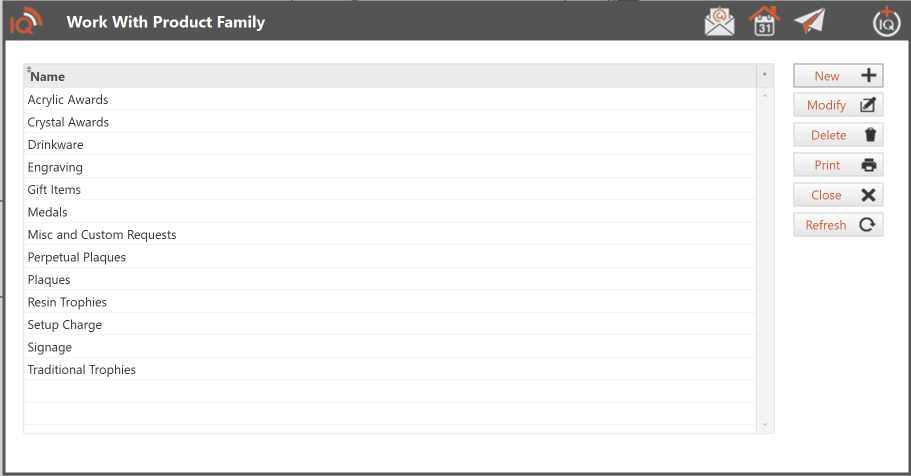
Adding a New Product Family
- Click New.
- The Maintain Product Family window opens.
- Enter the name of the new product family.
- Select a task workflow definition, if applicable.
- Enter the estimated person minutes for production scheduling.
- Configure the base pricing formula, if applicable.
- Select the desired unit price rounding option.
- Click Save.
See Maintain Product Family for detailed instructions about each setting.
Modifying a Product Family
To modify an existing product family:
- Select the product family from the list.
- Click Modify.
- Update the appropriate settings.
- Click Save.
Important: Modifying a product family's pricing formula does not automatically recalculate prices for existing detailed products. To update those prices, use the Apply Pricing Formula button in the Maintain Product Family window.
Deleting a Product Family
- Select the product family you want to delete.
- Click Delete.
- Follow the confirmation prompts.
Before deleting a product family, review any products assigned to it and reassign them if necessary.
Other Available Actions
| Button | Description |
|---|---|
| New | Create a new product family. |
| Modify | Change an existing product family. |
| Delete | Delete the selected product family. |
| Print the product family listing. | |
| Close | Close the window. |
| Refresh | Refresh the displayed product family list. |
Benefits of Using Product Families
Consistent Pricing
Establish common pricing formulas for related products and apply pricing updates across an entire product family when needed.
Standardized Production Workflows
Assign a task workflow definition to a product family so detailed products inherit the appropriate production workflow.
Improved Production Planning
Use estimated person minutes to help determine production time requirements and support scheduling.
Simplified Product Maintenance
Manage shared settings at the product family level instead of maintaining the same information separately for every detailed product.
Related Articles
- Maintain Product Family
- Maintain Products
- Maintain Detailed Products
- Task Workflow Definitions
- Product Pricing Formulas